Managing Active Sessions
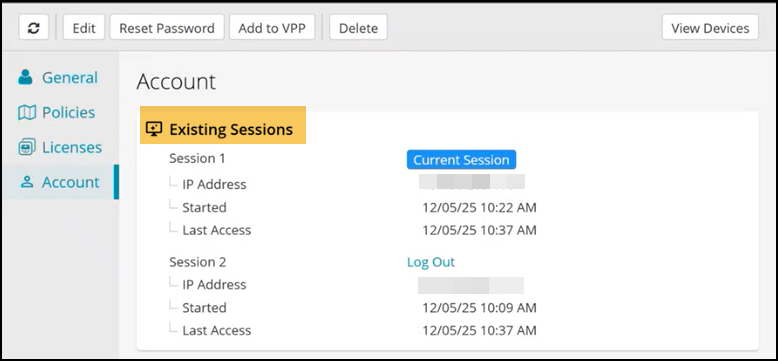
The Existing Sessions section on the User Details > Account provides admins with visibility into all active sessions for a user. It displays all active login sessions for the selected user. This feature helps improve security and account management by allowing admins to monitor and terminate sessions when necessary.
An admin can:
- End a suspicious or unauthorized sessions to prevent account compromise.
- Log out sessions on shared devices after a user leaves.
- Confirm whether a user is actively logged in across multiple portals for troubleshooting.
Each session in the list includes:
- A session label (for example, Session 1)
- IP address
- Session start time
- Last accessed time
- A Log Out link to terminate the session
Important:
- You cannot log out your own current session from this page. Use the Log Out option in the top navigation menu instead.
- Terminating a session immediately invalidates the user’s access for that session.