Manage email configurations in the Library
Related Video: Account Management: Email Configuration
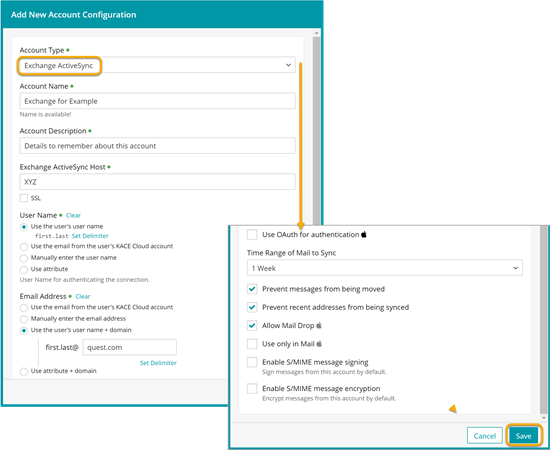
- To add a new email configuration to the library:
- Select the Libraries tab in top navigation.
- Click the Accounts icon.
- Click Add New.

NOTE: While using Exchange accounts is possible, using a Microsoft Outlook app is a better alternative. This allowing you to quickly create and manage custom app settings on managed devices, such as easily specify the Exchange domain name. For more details, see Android, iOS, and macOS apps: Deploy managed configurations to target devices.
- Enter required details and make selections.
You can use variables to replace text elements, as applicable. See Configuration variables for a full list of supported variables.
NOTE: If you want to prevent email messages from being moved from this email account to another one, or to disable forwarding or replying from a different account, select Prevent messages from being moved.
- Click Save.
- To edit an account configuration in the library:
- Select the Libraries tab in top navigation.
- Click the Accounts icon.
- Select an account name from the list.
- Click Edit.
- Make edits to any available fields in the configuration.
You can use variables to replace text elements, as applicable. See Configuration variables for a full list of supported variables.
NOTE: If you want to prevent email messages from being moved from this email account to another one, or to disable forwarding or replying from a different account, select Prevent messages from being moved.
- Click Save.
Edits to an existing account configuration will be applied to all devices where it has been deployed.
- To remove an account configuration from the library:
- Select the Libraries tab in top navigation.
- Click the Accounts icon.
- Select one or more email names from the list.
- Click Delete, then Confirm.
Deleting an account configuration from the library will remove it from all devices where it has been deployed.