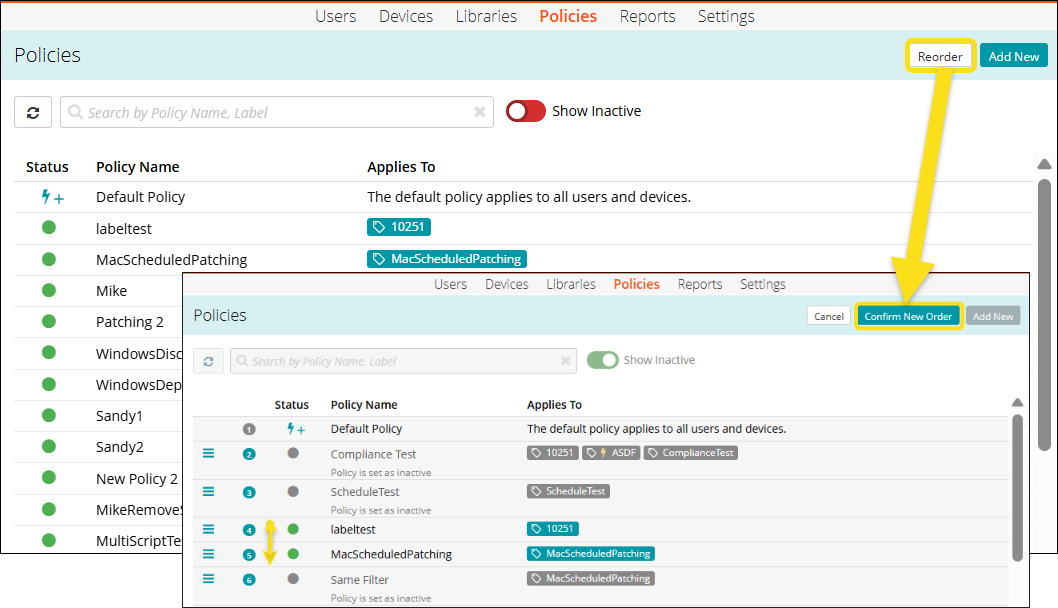
Reorder policies
The default policy is the baseline policy created by the system and it cannot be reordered. Policies that are added subsequently take precedence over the default policy in the event of a conflict.
Some Resource can only be applied once to a device. If such Resources appear in multiple policies that are associated with a device, KACE Cloud applies the Resource configuration associated with the highest priority policy, and ignores the lower-priority Resource configurations (appearing at a higher level in the list).
The Resource that can only be applied once to a device are:
- Passcode configuration
- Active Directory
- Encryption
- Location configuration
- Option sets
- Apps with app configurations
- VPNs with VPN mappings
|
|
NOTE: Only a single instance of an app with an app configuration can be applied to a device. The same principle applies to VPNs with VPN mappings. |

To reorder the list of policies:
- Go to Policies in top navigation.
- Click Reorder at the top right of the page.
- Once in reorder mode, you can click and drag to reorder your policies.
- Click Confirm New Order.