About subscriptions and licensing
Subscription and licensing information is managed from the Settings page in KACE® Cloud. It includes information on paid and trial subscriptions, licenses, start and end dates, available licenses, and more.
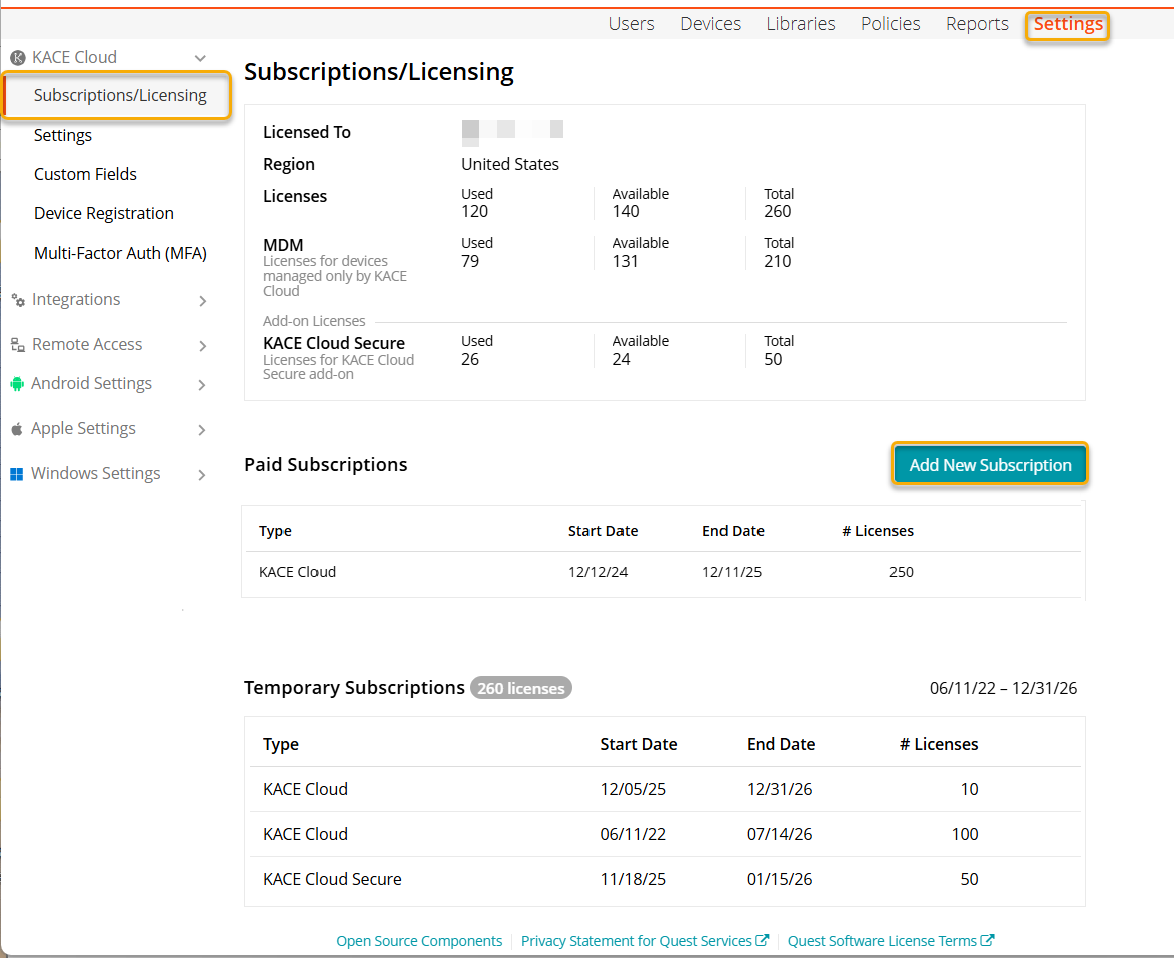
MDM Licenses
An MDM license plays a vital role in the comprehensive management of devices within the KACE Cloud ecosystem. This license facilitates the enrollment of devices for Mobile Device Management (MDM) purposes, allowing users to perform various functions effortlessly. Users can deploy applications, configure certificates, set up Wi-Fi configurations, and execute other essential MDM management tasks. Additionally, the MDM license extends its capabilities to agent-based management activities, providing additional capabilities not available through the MDM protocol alone.
The minimum purchase requirement is 25 licenses. For additional information, contact KACE Cloud Sales.
KACE Cloud Secure Licenses
KACE Cloud Secure is an add-on license that allows you to update the software or run custom scripts on your managed Windows and macOS devices to their latest versions. A KACE Cloud Secure license is consumed each time any enrolled device uses a KACE Cloud Secure feature. For example:
- When a patch is deployed to an enrolled KACE Cloud device, a license is consumed. Only when all patches are rolled back from the device and the device is considered unpatched, the license is released.
- When a device uses an iOS or macOS feature upgrade, or Windows Feature Update, a license is allocated for that device. The license is not released even if the feature is rolled back.
- When a script is deployed to a device on demand or through a policy. The license is not released if all scripts are removed from the device.
A license is released when:
- All patches are rolled back from a device and the device is considered unpatched.
- A managed KACE Cloud Secure device becomes unenrolled.
When a device is listed as being out of compliance due to insufficient KACE Cloud Secure licenses, this is stated in the Device History and also on the device's Policies tab.
For more details about KACE Cloud Secure features, see Configure Windows Updates in the Library and Patching Windows and macOS devices.
Companion Edition
The Companion Edition license is designed to support the registration of non-MDM devices as a standalone subscription. This license is suited for businesses that require management functionalities such as patching, scripting, inventory, and software distribution without MDM support.
The minimum purchase requirement is 100 licenses.
The MDM KACE Cloud Secure licenses when combined with the Companion Edition license, extends their capabilities, offering a more integrated and comprehensive solution for managing and securing organizational IT assets.
- MDM + Companion Edition License:
Allows to register non-MDM devices alongside MDM enrolled devices. - MDM with KACE Cloud Secure + Companion Edition License
:
Allows to register non-MDM devices alongside MDM enrolled devices. The KACE Cloud Secure license is consumed only for MDM-enrolled devices that include Patching and other Secure MDM functionality .
For more details or specific inquiries, contact KACE Cloud Sales.
Companion Edition with Remote
The Companion Edition with Remote license provides the same features as the Companion Edition license and enables remote access for Windows and Mac devices within your tenant.
The minimum purchase requirement is 100 licenses.
The key features of the license are:
- it can be used to provision both new and existing tenants, ensuring remote access is enabled for eligible devices.
- it can be combined with MDM and Secure licenses but cannot coexist with the Companion Edition license.
For more details or specific inquiries, contact KACE Cloud Sales.
|
|
IMPORTANT: For Companion Edition and Companion Edition with Remote licenses:
|

Paid Subscriptions
To discuss paid subscriptions and customized solutions, contact KACE Cloud Sales.
Trial Subscriptions
If you're running a trial subscription, you will have access to manually renew for an additional 30 days.
To renew your 30-day free trial in KACE Cloud:
- Go to Settings in top navigation.
- Under Subscriptions/Licensing, locate the expired license.
- Click the Renew button.
Learn more about free trials.
Temporary Subscriptions
Temporary subscriptions allow you to use the associated features during a limited time period.